There are hundreds of AI tools fighting for your attention right now, and most of them want your credit card. This AI tools guide 2026 cuts through the noise. Instead of ranking 50 products you’ll never try, we’re comparing the ones that actually matter across 5 categories: writing, SEO and content, design, coding, and productivity. For each, you’ll get real pricing, honest trade-offs, and a clear verdict on who should pay and who should skip. Whether you’re a freelancer watching every dollar or a team lead evaluating tools for 20 people, this guide is built to help you decide, not just browse.
How the AI Tool Market Actually Changed This Year
If you picked your AI tools in 2024 or early 2025, the landscape barely resembles what you remember. Back then, choosing an AI tool meant picking between 3 or 4 chatbots that all did roughly the same thing. Now, the market has split into sharp specializations. There are dedicated tools for blog writing, for SEO scoring, for code review, for slide decks, and for generating product images that actually look professional.
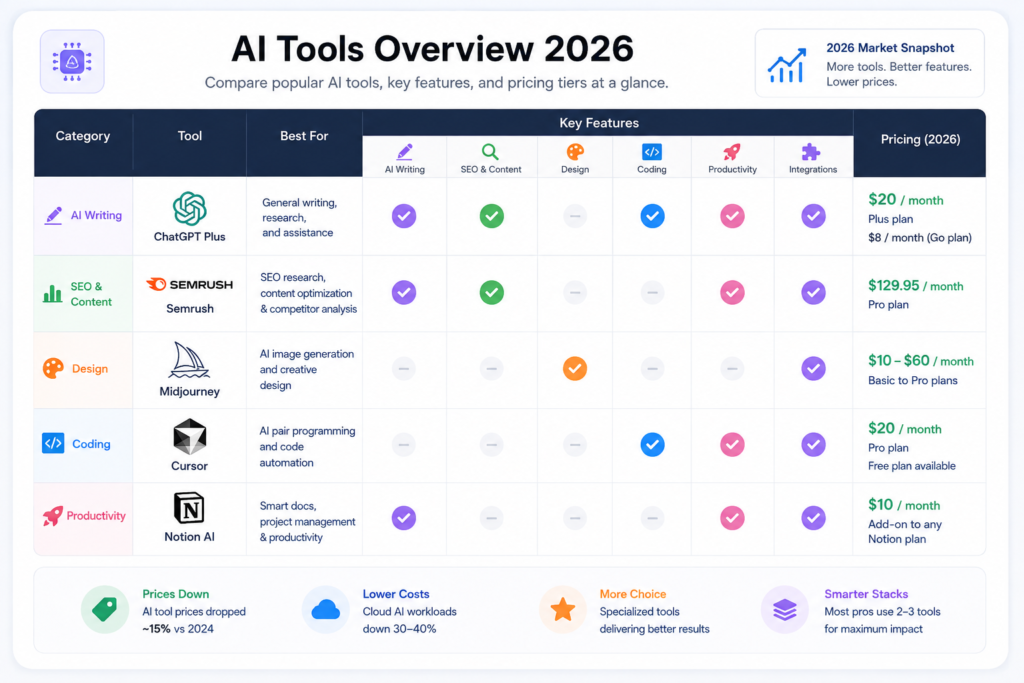
The pricing picture has shifted too. According to market analysis from Gartner, average AI software prices dropped about 15% since 2024 because competition intensified. Cloud computing costs for AI workloads fell 30% to 40% compared to 2 years ago. That’s pushed more tools into the $10 to $20 per month range for individuals, which is good news if you’re budget-conscious.
But here’s what nobody tells you: the sticker price is rarely the full cost. Many tools now meter usage with credits, tokens, or document caps. You sign up for $20 a month, burn through your allowance in 2 weeks, and suddenly you’re either upgrading or sitting idle until the meter resets. We’ll flag these traps as we go.
The other big shift is the “all-in-one vs. specialist” split. Platforms like ChatGPT and Claude try to do everything. Specialist tools like Surfer SEO, Midjourney, or Cursor do 1 thing extremely well. Most productive professionals in 2026 run a stack of 2 to 3 tools rather than betting everything on a single subscription. The goal of this guide is to help you pick the right 2 or 3 for your situation.
AI Writing Tools: What You’re Paying For (and What You’re Not)
The AI writing category has matured fast, and it’s also gotten more confusing. Some tools that used to be “AI writers” have pivoted entirely. Writesonic rebranded as an “AI Search Visibility Platform” and now starts at $39 a month. Copy.ai shifted toward enterprise sales automation with plans jumping from $29 to $1,000. If you haven’t checked in since 2024, don’t assume your old favorite still does what it used to.
Here’s where things stand for the tools that still focus on writing:
ChatGPT Plus ($20/month) remains the most versatile option. It handles everything from blog drafts to email rewrites to data analysis. OpenAI also added an $8 per month “Go” tier that covers most casual use cases without the full Plus feature set. For general-purpose writing, it’s hard to argue with the value.
Claude Pro ($20/month) consistently produces the best long-form writing quality among the major models. If your work involves detailed reports, nuanced analysis, or anything over 2,000 words, Claude tends to nail the structure and tone better than competitors. It’s also the strongest at following complex instructions without drifting.
Jasper ($59 to $69/seat/month) is still the go-to for marketing teams that need brand voice enforcement. It learns your style guide, your past campaigns, and your company wiki. That consistency is worth the premium if you’re managing a team of 5 or more writers producing content across multiple channels. For a solo creator, though, the price is steep when ChatGPT or Claude covers 80% of the same ground.
Rytr (~$7.50/month annually) is the budget pick. It handles blog sections, emails, ad copy, and social posts at a fraction of what Jasper charges. It’s not as feature-rich, but for side projects and small businesses watching every expense, it gets the job done.
The real question isn’t which writer is “best.” It’s whether you need a dedicated writing tool at all. For most individuals, ChatGPT Plus or Claude Pro handles writing alongside research, coding, and analysis in 1 subscription. Dedicated tools like Jasper earn their keep only when you need team collaboration, brand guardrails, or deep integration with your CMS.
AI SEO and Content Optimization Tools
SEO tools have split into 2 clean camps: all-in-one platforms that handle keyword research, backlink analysis, and site audits, and content optimization specialists that focus purely on helping your articles rank once you know what to write. The best teams tend to use 1 from each camp.
Semrush ($139/month) is the most complete all-in-one platform. It covers keyword research, competitor analysis, site audits, PPC tools, and recently added an AI Visibility Toolkit that tracks how your brand appears in ChatGPT, Perplexity, and Google AI Overviews. If you can only afford 1 SEO subscription, Semrush gives you the widest coverage. The downside? That price tag stacks up fast when you add extra seats at $45 to $100 each.
Ahrefs (from $29/month) still has the deepest backlink index and the cleanest interface for link analysis. If your strategy depends on understanding your backlink profile and finding opportunities for ethical link building, Ahrefs gives you data that others can’t match. Their Starter plan at $29 is genuinely useful for solo operators, which makes it the most affordable entry point for serious SEO work.
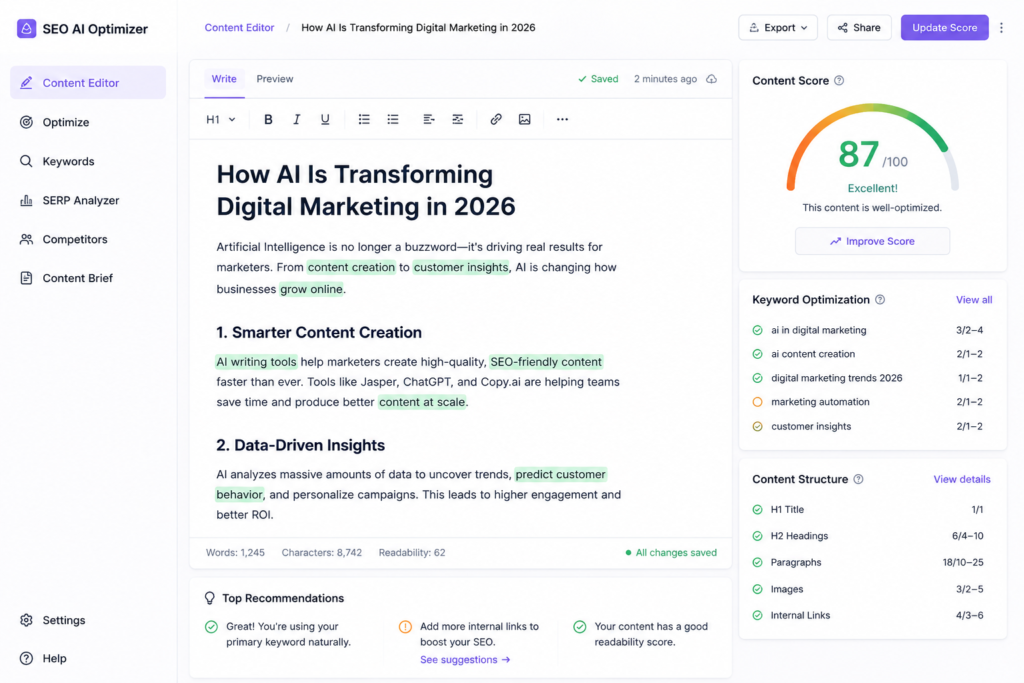
Surfer SEO (from $49/month) leads the content optimization category. Its Content Editor scores your drafts against the pages already ranking for your target keyword and gives you real-time recommendations on word count, heading structure, and NLP terms to include. It also integrates directly with Google Docs, WordPress, and Jasper. For teams publishing 10 or more articles monthly, the optimization lift is measurable. The catch: Surfer doesn’t do keyword research or backlink analysis, so you’ll likely pair it with another tool.
Frase (from $39/month) is worth a look if you want content optimization and research briefs in 1 tool at a lower price point. It recently added a combined SEO and GEO score that predicts how your content will perform in both traditional search and AI-generated answers, which is a feature nobody else offers yet.
A note on the secondary benefits of content tools: strong content is still the foundation of how to get backlinks naturally. When you publish well-optimized, genuinely useful articles, other sites link to them without you begging for it. That’s the core of white hat backlinks, and it’s why investing in content optimization tools often pays dividends beyond just ranking. For anyone doing link building for business, pairing a tool like Surfer or Frase with a solid content calendar is one of the most effective strategies you can run. Tools handle the optimization; your job is creating something worth linking to. If you want more technology insights and tool recommendations, we cover this space regularly.
AI Design Tools: Choosing Between Quality and Convenience
The AI design market has a clear trade-off at its center: you can have the best image quality, or you can have the most convenient workflow. Very few tools deliver both.
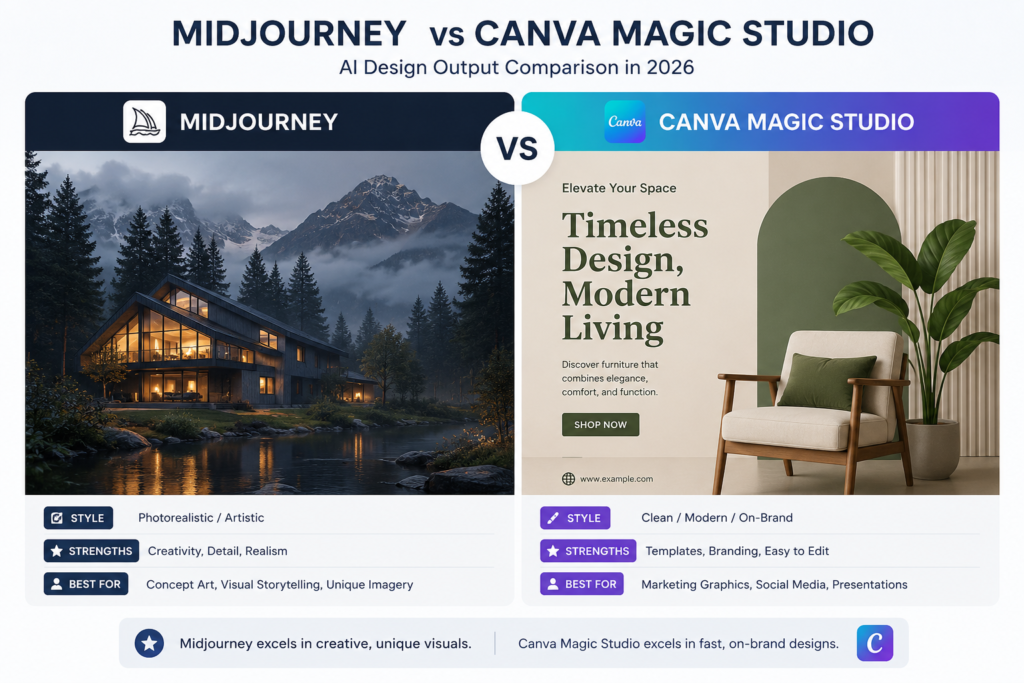
Midjourney ($10 to $30/month) still produces the most visually striking images of any AI generator. For editorial imagery, concept art, social media visuals, and anything where aesthetics matter more than speed, it’s the benchmark. The $30 Standard plan is required for commercial use, though, and there’s no free tier anymore. The workflow also runs through Discord or its web app, which some people find clunky compared to drag-and-drop editors.
Canva Magic Studio (free to $15/month) is the opposite trade-off. The image generation quality sits below Midjourney, but the entire design workflow lives in 1 platform. You generate an image, drop it into a social post template, add your brand fonts and colors, and export in the right dimensions for every platform. For marketing teams producing high volumes of social content, presentations, and ads, that convenience crushes everything else. Canva’s Pro plan at around $13 a month per person is some of the best value in the entire AI tool market.
Adobe Firefly (from $9.99/month) fills a specific niche: commercial safety. It’s trained exclusively on licensed content from Adobe Stock and public domain sources, making it the safest choice for businesses worried about copyright liability. Adobe also offers IP indemnification on enterprise plans. If you’re already paying for Creative Cloud, Firefly is included, which makes it a no-brainer addition to your workflow in Photoshop and Illustrator.
Recraft deserves a mention for anyone who needs vector output. It’s the only AI tool generating native SVGs instead of raster images, which matters for logos, icons, and any asset that needs to scale cleanly.
The pattern here is clear. Start with Canva if you need volume and speed. Add Midjourney if your work demands visual quality that stops people mid-scroll. Use Firefly if copyright risk keeps you up at night. And whatever you choose, don’t expect any AI design tool to replace a human designer for brand strategy across 10 different formats. They’re fast, not thoughtful.
AI Coding Tools: The Three-Way Race
3 tools dominate AI-assisted development in 2026, and they take fundamentally different approaches. Most productive developers don’t pick just 1. They combine 2.
GitHub Copilot (free to $19/user/month for Business) is the enterprise standard. It offers the widest IDE support (VS Code, JetBrains, Neovim), IP indemnity on Business and Enterprise plans, and a free tier with 2,000 completions per month that’s genuinely usable for learning and side projects. In June 2026, GitHub moved to usage-based billing with AI Credits, so heavy users of chat and agent features can blow past the base allowance quickly. The $10 per month Pro plan is still the cheapest paid entry point in AI coding.
Cursor ($20/month Pro) is a standalone IDE built as a VS Code fork with AI baked into every interaction. It’s not a plugin you bolt on; it’s a complete editor redesigned around multi-file editing, inline completions, and agent mode for implementing whole features. Developers who’ve switched to Cursor tend to love it. The $20 Pro tier is widely considered the best single-tool value in AI coding right now, though heavy agent users may need the $60 Pro+ or $200 Ultra plans. If you prefer working visually with diffs and inline suggestions, Cursor is your tool.
Claude Code ($20/month with Claude Pro) takes a terminal-first approach. It runs from your command line, reads your entire codebase for context, and handles autonomous multi-file changes better than the alternatives. For complex refactoring, architectural decisions, and debugging that requires understanding how 15 files interact, Claude Code has the highest capability ceiling. The Max tier at $100 per month gives 5x the usage for developers who live in their terminal all day.
The most common stack in 2026, cited by multiple developer surveys, is Cursor for daily editing plus Claude Code for complex tasks, running about $40 per month combined. If your company is already on GitHub Enterprise, Copilot is the path of least resistance. If you need hosting infrastructure alongside your coding tools, pairing these with a solid host matters too. We’ve covered the top managed WordPress hosting companies for 2026 if you’re building on that platform.
AI Productivity Tools: Where the Workflow Meets the Wallet
Productivity AI isn’t about which model is smartest. It’s about which model is closest to where you already work. A powerful AI that requires switching tabs won’t get used. A mediocre AI that’s already inside your inbox will.
Microsoft 365 Copilot ($30/seat/month add-on) puts AI directly inside Word, Excel, Outlook, and Teams. For organizations already standardized on Microsoft, the integration is seamless. But the real cost is higher than the headline: you need a qualifying Microsoft 365 license underneath ($12.50 to $22 per user), pushing the total to $42 to $52 per seat per month. For large teams, that adds up fast. Smaller businesses got a break in late 2025 when Microsoft cut the Business-tier price to $21 per seat.
Google Gemini for Workspace takes a bundled approach. AI features are now included in Workspace plans rather than sold as a separate add-on, which means if you’re a Google-native team, you might already have it. The integration across Gmail, Docs, Sheets, and Slides is improving, though it still trails Copilot on Excel-equivalent tasks.
Notion AI ($8 to $10/user/month add-on, included in Business at $15 to $18/user) works best for teams that already use Notion as their knowledge base and project tracker. The AI summarizes meetings, drafts documents, extracts action items, and searches across your workspace. If your company runs on Notion, this is the most natural AI add-on you can get. If you don’t use Notion, adopting it just for the AI features doesn’t make sense.
ChatGPT Team and Claude for Teams ($25/seat/month each) are the standalone options for teams that want a general-purpose AI assistant without being locked into a specific productivity suite. Both include admin controls, privacy guarantees that your data won’t train models, and higher usage limits. Claude tends to perform better on long documents and careful analysis. ChatGPT has the broader feature set with custom GPTs and a larger plugin ecosystem. Many teams that can afford it run both and let people use whichever fits the task.
Free vs Paid: When Upgrading Actually Makes Sense
Every major AI platform now offers a free tier, which is great for experimenting but often frustrating for real work. Knowing when to upgrade saves you from either wasting money or wasting time.
Stay free if: You use AI a few times a week for quick questions, brainstorming, or short drafts. The free tiers of ChatGPT, Claude, and Gemini handle casual use well. GitHub Copilot’s free plan with 2,000 completions is enough for learning and hobby projects. Canva’s free tier covers basic design needs without AI generation.
Pay $10 to $20/month if: You use AI daily for work. This is the sweet spot where most individuals land. A single subscription to ChatGPT Plus, Claude Pro, or Gemini Advanced at $20 per month covers writing, research, coding help, and analysis. GitHub Copilot Pro at $10 is the cheapest coding upgrade. Midjourney Basic at $10 gets you into quality image generation.
Pay $40 to $100/month if: AI is a core part of your professional output. This is where you start stacking tools: a general assistant plus a specialist. A freelance writer might run Claude Pro ($20) plus Surfer SEO ($49). A developer might run Cursor Pro ($20) plus Claude Code ($20). A marketer might combine ChatGPT Plus ($20) with Canva Pro ($13) and Semrush ($139). At this tier, the ROI math matters. If your AI stack saves you 2 to 3 billable hours per month, a $40 toolkit pays for itself within weeks.
Pay $100+ per month if: You’re running a team or your work depends heavily on specialized AI. Enterprise plans, multi-seat subscriptions, and power-user tiers live here. The cost is real, but so are the productivity gains when tools are properly adopted.
Which AI Tools Are Worth It? Verdicts by Use Case
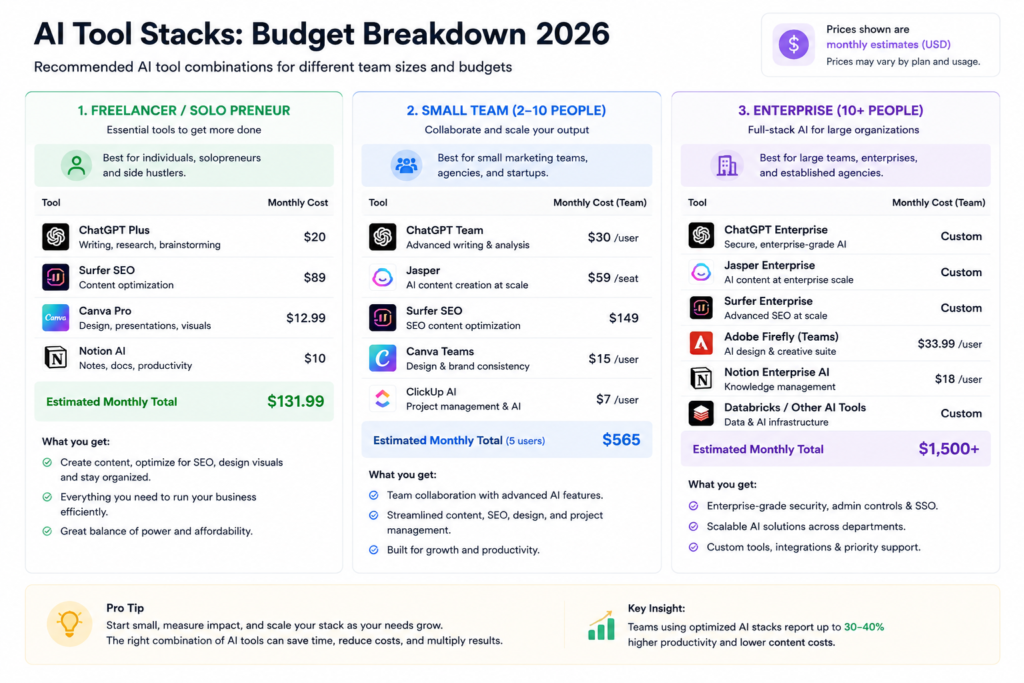
You’re a freelance writer or blogger. Start with Claude Pro ($20/month) for the best writing quality and long document handling. Add Surfer SEO ($49/month) if you publish enough content to care about rankings. Skip Jasper unless a client requires brand voice features. Total: $20 to $69 per month.
You’re a marketer or content manager. ChatGPT Plus ($20/month) for versatility, Canva Pro ($13/month) for design volume, and either Semrush or Ahrefs for SEO research. If budget allows, add Surfer for content optimization. This stack handles content creation, design, and analytics. Total: $33 to $170+ per month depending on SEO tool choice.
You’re a developer or technical founder. Cursor Pro ($20/month) for daily coding plus Claude Code ($20/month with Claude Pro) for complex tasks. That $40 combined stack is the most-cited developer setup in 2026. If your company mandates GitHub, Copilot Pro at $10 is the starting point, and you can layer Claude Code on top. Total: $10 to $40 per month.
You run a small business (5 to 20 people). Start with 1 general AI assistant at the team level. ChatGPT Team or Claude for Teams at $25 per seat covers most needs. Layer on Canva Pro for design work and whatever SEO tool matches your growth strategy. Don’t buy individual subscriptions for every employee. Audit seats quarterly and reclaim unused ones.
You’re evaluating for an enterprise. Microsoft 365 Copilot if you’re a Microsoft shop. Google Gemini if you’re on Workspace. Layer specialized tools (Jasper for marketing, Cursor or Copilot for engineering) by department rather than company-wide. Run a 90-day pilot with 1 team before rolling out broadly. The biggest waste in enterprise AI isn’t picking the wrong tool. It’s buying 500 seats and having 50 people actually use them.
Building Your AI Stack Without the Bloat
The trap in 2026 isn’t missing out on the right tool. It’s subscribing to too many. Here’s how to stay lean.
Pick 1 general-purpose AI assistant first. ChatGPT Plus or Claude Pro. Not both, unless you’ve tested both for a month and genuinely use different ones for different tasks. This covers 60% to 70% of what most people need from AI.
Add 1 specialist tool based on your primary workflow. If you write for a living, that’s a content optimization tool. If you code, that’s Cursor or Copilot. If you design, that’s Canva or Midjourney. The specialist should do something your general assistant can’t, like real-time SEO scoring or multi-file code editing.
Resist the third subscription until you’ve maxed out the first 2. Every new tool adds context-switching cost, another login, another billing cycle, and another interface to learn. The productivity gain from tool #3 is almost always smaller than the gain from tool #1.
Review your stack every quarter. AI tools evolve fast. The pricing plan you signed up for in March might look different by September. Tools merge, pivot, or get acquired. Check whether what you’re paying for still matches what you need.
The best AI setup isn’t the most expensive one or the one with the most features. It’s the one you actually use, every day, to do work that matters. Start small, measure the impact, and add tools only when the gap is obvious. That’s how you get real value from AI in 2026 without the subscription bloat.
Got questions about which AI tools fit your workflow? Reach out to the Must Read Digest team and let us know what you’re working on.